What is RGB? How RGB color works in design

Share What is RGB? How RGB color works in design
Explore more from
Design basics
Master color to elevate your designs
Experiment, refine, and apply color palettes in Figma.
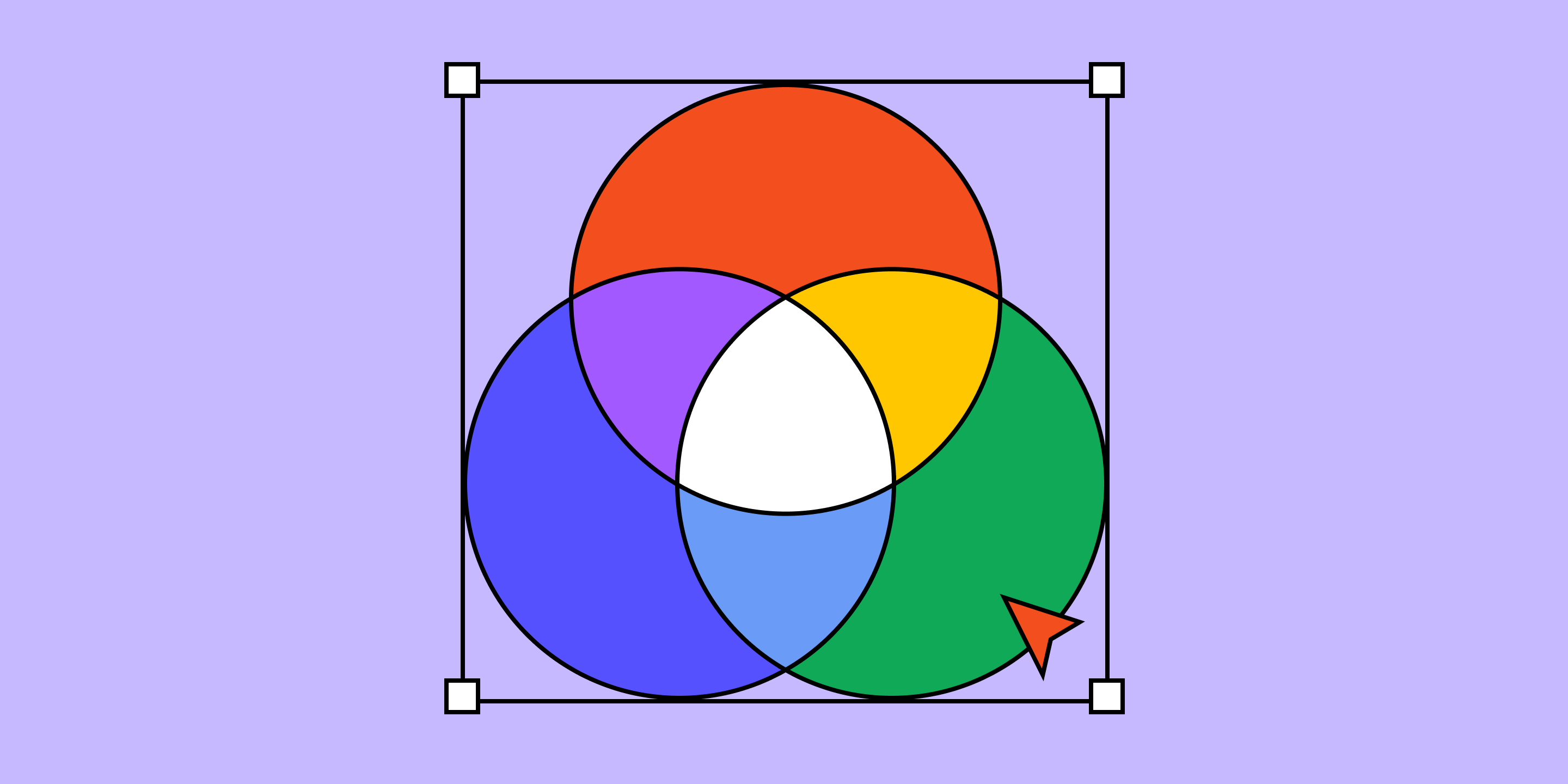
RGB (red, green, and blue) is the fundamental color model used in digital design. By combining red, green, and blue light in varying intensities, designers create the colors we see on screens—from TVs to laptops to mobile phones. Understanding how the RGB color model works ensures vibrant and consistent colors, creating an immersive and compelling digital experience. Ready to learn more about the RGB color system?
This article covers:
- How the RGB color model works and how it’s used.
- The difference between RGB and CMYK color systems.
- How Figma’s features make it easy to work with the RGB color model.
How does RGB work?
The RGB color model uses additive color mixing. It combines light from the primary colors of red, green, and blue to create an array of color shades.
Each color channel has an intensity ranging from zero (complete darkness) to 255 (maximum brightness). When all three colors are mixed at their lowest intensity, they create black. When they are combined at their maximum intensities, they yield white.
The beauty of the RGB color model lies in how these intensities blend to create a spectrum of colors ranging from dark shades to light tints.
How is RGB color used?
In the RGB color model, light is used to produce different color variations for digital design and technology. Anything that uses light to produce an image uses RGB colors.
Some common applications that use the RGB color model include:
Web design to create the different elements on a webpage.
- Graphic design to create logos, advertisements, and other design projects.
- Digital displays like LED screens, smartphones, and computer monitors.
- Digital photography, where cameras or phones capture images.
- Video editing to process and apply effects to videos.
RGB vs. CMYK
RGB and CMYK are the two main color models used for designs.
- RGB colors are used for on-screen viewing. RGB is an additive color model, meaning it adds red, green, and blue light together to create the different colors you see on a screen. The color of each pixel on a screen is determined by the amount of red, green, and blue light it emits.
- CMYK colors are used for color printing. CMYK is a subtractive color model, which includes cyan, magenta, yellow, and key (black)—the colors we see in ink cartridges. Unlike the RGB model, when combined at full intensity, the colors create black. When ink is printed onto white paper, the millions of overlapping dots create different combinations of colors.
RGB colors don’t translate the same on paper as on screen. So, to print a digital image or project, you must convert the colors from RGB to CMYK.
For example, let’s say you design a graphic for a promotion. You may have a version of it that lives in the digital space, but also need to print that same graphic for an event. To ensure the graphic prints in the hues you intended, you’ll need to convert it from RGB to CMYK. You can do this by changing the color profile in your design tool or using an online color converter.
Streamline the design process with Figma
RGB color is essential for creating colorful digital content across different devices. Whether you’re designing a new landing page for your website or creating a prototype, Figma can help. Here’s how:
- Use Figma’s color wheel to choose a color palette that best fits your next design.
- Browse color plugins within Figma’s design community for color scheme options and ideas.
- Use Figma’s Essential UI kit to bring consistency to your designs through premade color palettes and layouts.
Ready to use color to bring your designs to life? Create, share, and test designs for any device with Figma Design.
Keep reading


What is UI design
What is UI design today, and what role does it play in the design thinking process?
Learn more

What is visual hierarchy
If everything looks the same, then you see nothing. Visual hierarchy can change that.
Learn more


UI vs UX
Read on to find out what it takes to design engaging UI, and create a memorable UX.
Learn more
From the blog
How to put your design system to work with the Figma agent
Your design system can help the Figma agent understand the principles and guidelines that define your product. Here’s how to make that context useful to the agent.
Workflow lab: Staying in the flow with Figma’s agent
Knowing what work to hand to an agent is a skill of its own. This workflow shows how a designer shapes a new temporary-access feature while the Figma agent handles the library updates, crit feedback, and a first draft of a design system spec.
How to lighten design system upkeep with the Figma agent
Figma’s agent can take on repetitive work across your design system, from maintaining your library to automating how designs adhere to it. Here, we share a few ways to put the Figma agent to work.
Workflow lab: From design system to campaign in Figma Weave
Design systems can power more than just designs. This workflow shows you how to turn raw materials into brand campaign collateral using the Gen Effect and Figma nodes.

How Coinbase used Code Connect to guide agents and shrink token costs
The Coinbase Design System team put Code Connect to the test against coding agents—and found that it boosted design system adherence while cutting token costs by an average of 22.5%.
Workflow lab: Moving between design and code with agents
Coding agents are reshaping how developers build, but they’re only as good as the input they’re given. This workflow explores how context keeps code and canvas in sync.