
How to make a mood board in 5 simple steps
Learn how to make a mood board and gain inspiration with FigJam’s free templates—see the benefits of mood boards and design examples.
Skip to main content
Strategic planning
You’re kicking off a new feature, and the first question in the room is “Who is this actually for?” If your team walks into that first design review with three different mental pictures of the user, you have a problem.
Learning how to create a persona gives your team one shared idea of the person you’re designing for, built from real research instead of guesswork. A persona answers the questions that shape everything else downstream. What does this person need? Where do they get stuck? What would make them trust your product enough to stick around?
Clarity here pays off in measurable ways. The Figma State of the Designer 2026 report found that 91% of designers say clear goals and expectations help them do their best work, and a persona is one of the most concrete ways your team can hand itself that clarity before a project even starts.
Skip this step, and your team ends up designing for an imaginary “everyone,” which means designing for no one in particular. Get it right early, and every decision that follows—from your first wireframe to your onboarding copy—has something real to point back to.
Read on to learn:
A user persona is a semi-fictional profile of your target user built from real-world data and insights. You’ll see this same idea go by different names depending on who’s asking.
Product teams usually talk about how to create a user persona, sales teams explore how to create a buyer persona, and marketers often frame it as how to create a customer persona. The same approach works for all three; only the specific questions you ask change.
Personas also help you offer a more personalized experience, which is valuable. According to the HubSpot team, 93.2% of marketers say that personalized user experiences lead to more leads and purchases.
If you’re building a project-management tool for creative teams, one persona might be “Design Lead Priya,” a 34-year-old team lead who checks her team’s project board before every design review. Priya isn’t a real person, but she’s a composite of the patterns your research turned up in the design-lead segment of your users.
A persona like Priya is a mini-biography. Demographics, goals, frustrations, and personality traits paint a picture of someone who represents a larger group of your target users. Think of it as answering the question, “Who is our ideal customer?” The answer will help your team make informed decisions when refining a marketing strategy or a product development roadmap.
When your team understands Priya’s goals and behaviors, they can design with her in mind. The result is a product that speaks to her day-to-day needs and keeps her coming back.
Creating a great persona starts with empathy—seeing the world through your user’s eyes. By understanding their needs, you can design experiences that resonate. The level of detail in your persona will depend on your business goals and the data your team finds beneficial to collect.
The first few steps are all about research. The goal here is to find out who your users are, how they group together, and what makes each group tick. You can also use Figma Weave to generate a visual for your persona in minutes.
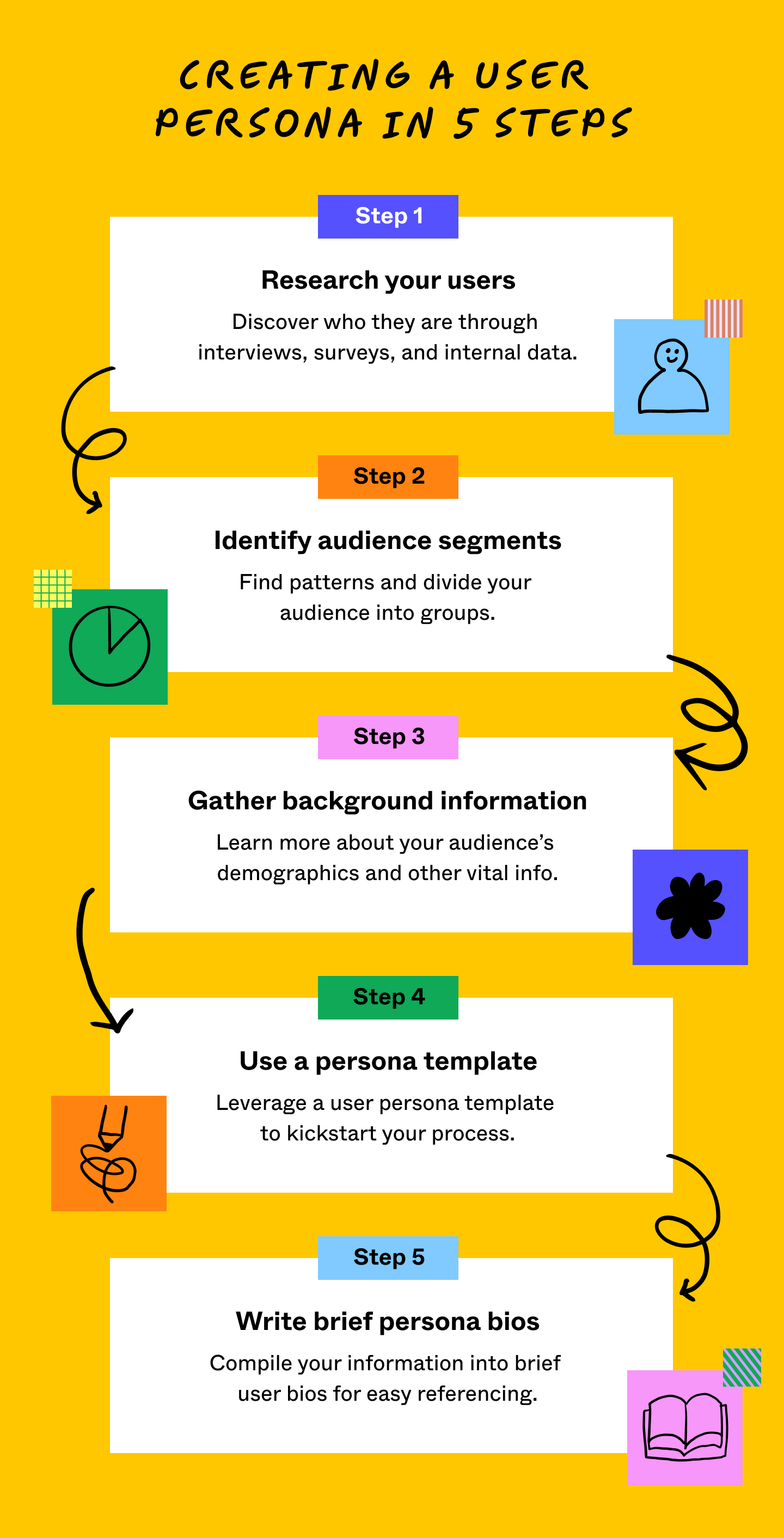
Strong personas rest on reliable data, not hunches. If you already have users, here’s how to gather the research you need:
If you’re building your first product and don't have users yet, market research can inform your personas. Here’s how to gather reliable data and apply market research:
| Method | Purpose | How to | Best for |
|---|---|---|---|
| A/B testing | See which option resonates more | Test two versions of a design or message with different audience segments | Comparing specific choices before you commit |
| Focus groups | Gather detailed, qualitative feedback | Organize a live discussion with a handful of potential users | Exploring preferences before you build anything |
| Interviews | Uncover motivations, pain points, and goals | Have one-on-one conversations that dig into the “why” | Early-stage discovery when you need depth over volume |
| Surveys | Collect insights at scale | Send structured questions to a broad audience online | Validating a pattern across a large group |
| Web scraping | Spot patterns in public behavior | Analyze reviews, forums, and competitor sites for recurring themes | Filling research gaps before you have direct user access |
Once you’ve gathered your initial research, it’s time to spot patterns. The goal is to group users with similar characteristics into a few distinct categories. If you’re building a project-management tool for creative teams, your audience might break down like this:
These users might all rely on your product, but their needs and habits look pretty different. That gap gives you the basis for three distinct personas, one for each group. To make sense of large amounts of data, use brainstorming templates or mind maps. Visualize the segments with FigJam mind maps to help you organize and label trends, leave notes, and pull your team into one shared view.
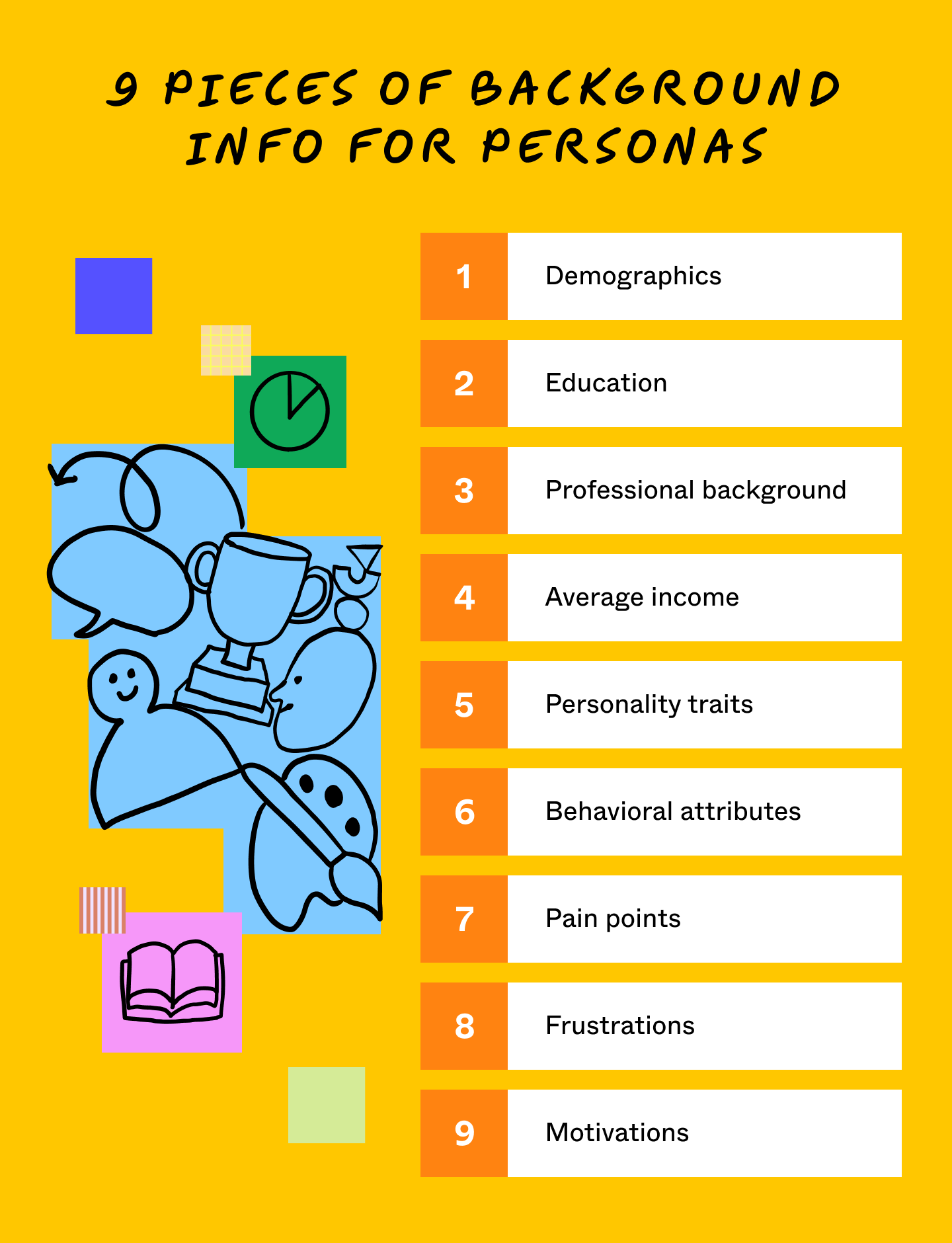
Your research will uncover key details about each persona, giving you a clearer sense of who this person is and why they’re drawn to your product. With just a few data points, you can start shaping their story.
For Design Lead Priya, our example persona for in-house design teams, here’s what her background might look like:
| Demographic | 34 years old, based in Austin, leads a nine-person design team |
| Education | Bachelor’s degree in graphic design |
| Average income | $118,000 per year |
| Personality traits | Eight years in product design, three as team lead |
| Behavioral attributes | Checks the project board before her first meeting each day |
| Pain points | Juggling design reviews across several projects at once |
| Frustrations | Dislikes tools that make her team duplicate work across platforms |
| Motivations | Wants her team to spend more time designing and less time in status meetings |
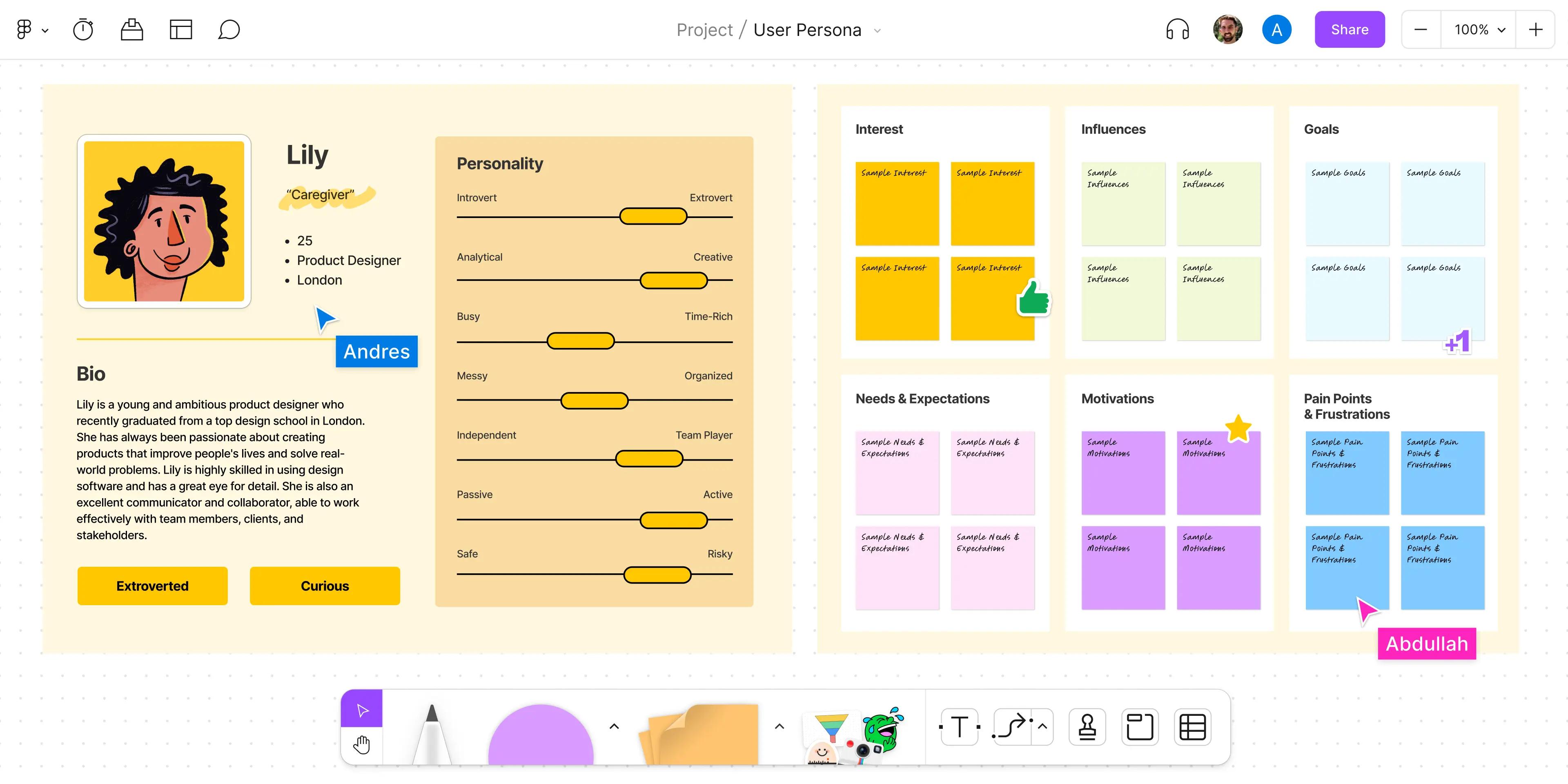
Once you’ve gathered these details, you can organize them with the persona template in FigJam and share them with stakeholders.
Here’s how to create a persona with AI, using this Figma Weave workflow as your starting point:
Drop the generated visual into the same persona template in FigJam or the Figma Design persona template you used for the written details when you researched users, identified segments, and gathered background info. This step isn’t a replacement for the template. It’s what finally puts a face to it.
To expand your persona with more visuals, try creating a mood board. With more context from a mood board, stakeholders quickly understand who your users are, how to engage them, and how to design experiences that meet and exceed their expectations.
Turn research and a reference photo into a realistic scene for your persona in minutes.
A short bio can make your personas feel more relatable, helping your team empathize with users and anticipate their needs and behaviors. Here’s an example based on Design Lead Priya:
“Priya leads a nine-person design team and splits her day between meetings and Slack. Her only real quiet time is the 10-minute walk to get coffee, which is when she listens to design podcasts. To stay ahead of a packed week, Priya checks her project board first thing every morning and blocks off two hours for deep design work before her calendar fills up.
Priya keeps a running list of tools that her team tries and drops. She follows a few design leaders on LinkedIn and reads UX case studies on her commute. She’s most likely to adopt a new tool if a peer she trusts recommends it first.”
Once your personas take shape, invite your team to add detail to the FigJam persona template. As your team gets to know your personas, they’ll be better equipped to design workflows and make decisions that align with your users’ needs.
Different types of user personas can help you match your audience’s needs more effectively. By building a persona that accurately reflects your users, your team can make more informed decisions. Remember to update your personas regularly to keep them current as your audience evolves.
A goal-directed persona is ideal when you’re focusing on your user’s main intent. These personas highlight what users are trying to achieve and the obstacles they face along the way.
Example: For a freelance designer persona, the goal might be finding a tool that keeps client feedback in one place. For an in-house design lead, the goal could be cutting down the back-and-forth between design and engineering.
Role-based personas focus on a user’s role or position. That person could be a small business owner or the head of marketing for a large corporation. These personas emphasize the responsibilities, decision-making power, and tasks related to their position.
Example: A design director persona might highlight budget ownership and cross-team influence, while an individual contributor's persona could emphasize hands-on craft and speed.
An engaging persona brings your audience to life by including more personal details like backstories, personality traits, and individual motivations. While fictional, these personas help your team connect with the audience on a deeper level and bring clarity to user-centric decisions.
Example: Your persona, Theo, is a 27-year-old junior product designer. His motivations drive him toward tools that help him look more senior in design reviews, like ones with built-in versioning and easy stakeholder sharing.
Creating user personas can be challenging, but with the right strategies, you can overcome the most common obstacles. Whether it’s getting your team on the same page or keeping your personas current, here are some tips to tackle the challenges:
Now you know how to create a persona, and you’re ready to put an actual face on your next user with Figma Weave.
Once you build a persona—and put a face to it with Figma Weave—the real value comes from what your team does with it next. Share it before a design review, or map it against a customer journey to see where users might drop off.
Here’s how to get started:
The FigJam persona template gives your team one shared place to turn research into a persona everyone can reference.
Learn how to make a mood board and gain inspiration with FigJam’s free templates—see the benefits of mood boards and design examples.


Understanding UX for product managers helps you build products people love. Learn how to step into the design process early and collaborate on user problems.

Learn the ins and outs of user journey mapping, including when to use a user journey map, how to craft it, and how it will transform your user experience.

Discover the power of a user flow in UX design, plus how to create one with FigJam, examples, and the differences between user flows and other common diagrams.

Discover AI tools for UX designers in 2026 to streamline your design process, improve productivity, and enhance user experiences with cutting-edge technology.


Learn how UX validation helps you spot logic gaps and refine interaction patterns before dev. Use Figma Make to ship dev-ready designs with confidence.
Build faster with Figma Weave