Building Figma AI
Building Figma AI
Figma AI is designed to help you work more efficiently and creatively. Whether you’re building a code prototype or working with the Figma agent to explore directions and automate tasks, we’re building AI so you can stay in the flow. Learn more about our approach below.
Our approach
Figma AI is powered by a mix of third-party models and first-party models. We continually evaluate which models are best for specific use cases while balancing quality, speed, and cost. To learn more about our AI capabilities, visit our AI workflows page.
Off-the-shelf models are great generalists, but often aren’t built for specialized domains like design. That’s why we also build our own first-party models by post-training open models to optimize for design concepts, patterns, and use cases. This helps AI agents better understand Figma’s tools and formats, and work with your existing design systems and context on the canvas.
Model strategy
We test and use a variety of models from frontier labs like OpenAI and Google, as well as open-weight models such as Qwen, Inkling, Muse Spark Open, and more. We regularly update the models to ensure Figma AI is powered by the latest technology.
For some AI features, you can experiment with different models through a model selector. Other capabilities, like the Figma agent, automatically select the best model for the task at hand.
You can find more information about the sub-processors behind Figma AI here, and the models currently powering the capabilities here.
Model training
With the right training and data, first-party models can outperform frontier models on specific tasks, including design work. To protect your privacy, we take steps to de-identify data we use to train AI models. Here’s an overview of the types of data we may use to post-train open models.
Content data
Sharing your customer content with Figma for AI model training is optional. Admins can control customer content sharing with a setting. Customer content includes materials created in or uploaded to Figma.
Examples of content data:
- Text and images
- Comments and annotations
- Layer names and properties
Usage data
Usage data is distinct from customer content and relates to how Figma is accessed and used, but usage data does not include your content itself. This data is used in an aggregated, de-identified way to help protect your privacy.
Examples of usage data:
- Information about how your organization’s content is used (like how many times it is accessed)
- Technical logs and metadata
- Telemetry data
Choose how your content is used
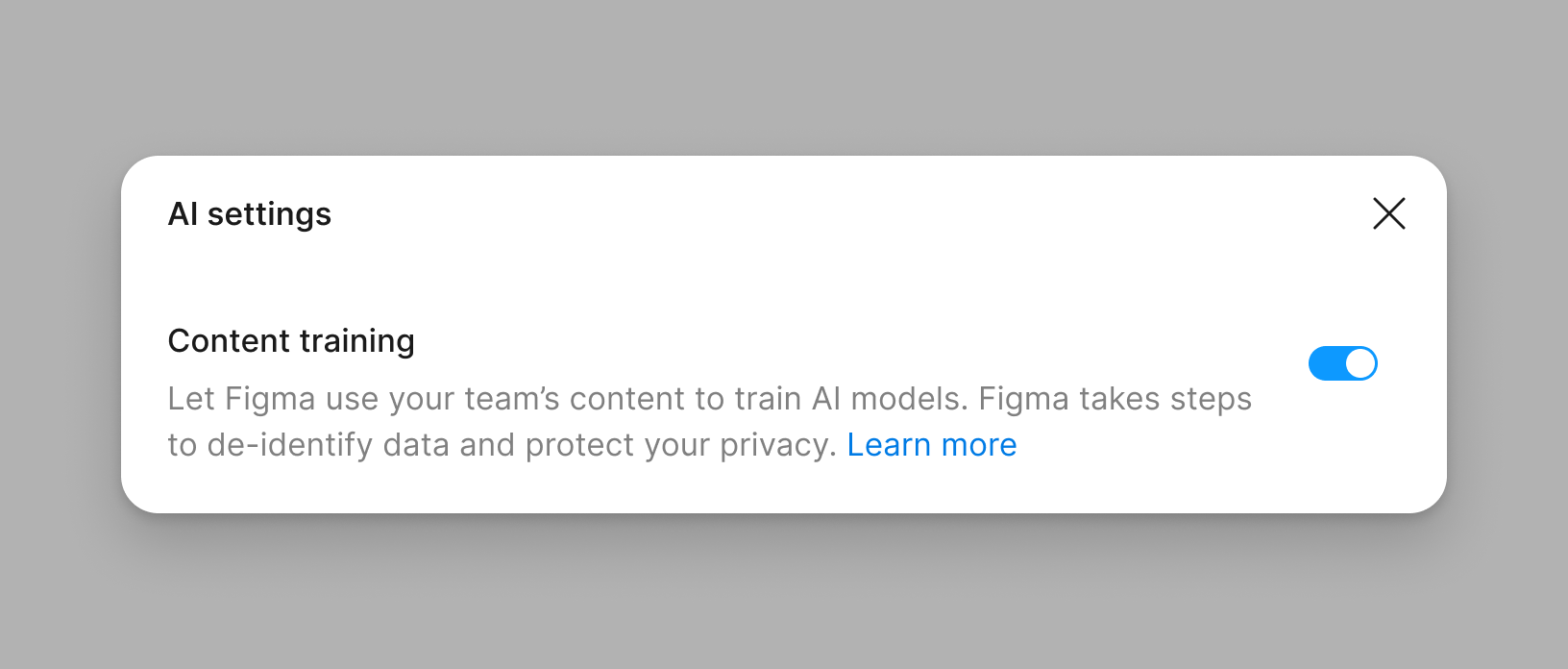
Admins have control over AI content training, which they can adjust with a setting. Admins can turn this setting on or off at any time. This setting varies by your Figma plan type:
- For Starter and Professional plans, content training is set to ‘on’ by default. This is a team level setting and admins can opt-out.
- For Organization and Enterprise plans, content training is set to ‘off’ by default. This is an organization-level setting.
Our customer agreements with Organization and Enterprise plans are typically more complex and include specific requirements and restrictions, which is why we’ve chosen a different default setting for those plans.
We do not use any data from Figma for Education (K-12) or Figma for Government accounts for model training.
Data privacy and security
We know how important your data is to you, your company, and your clients. Our model development process is designed to protect your privacy and confidential information.
For all customer data, we:
- Encrypt all data at rest and in transit
- Use security measures designed to protect against unauthorized access to customer data
- Enforce tailored permissions and user access controls around who can view and access your data
When using open-weight models, including those originally developed within and outside of the US, we:
- Maintain no data connection to the original developer
- Uphold our existing data processing agreements and data residency commitments
When working with third-party companies to process data, we:
- Do not permit third-party model providers to use data that customers upload or create on the Figma platform for training their own models
- Limit how long vendors can store data. We take steps to require our third-party model providers to delete inputs and outputs after processing.
Read more about Figma’s security practices here.
A note for Figma Community creators
Building and learning together with Figma’s Community helps make Figma better. Free files in the Figma Community are under CC BY 4.0 licenses, which allow transformation and require attribution, but what constitutes attribution in the field of AI is a widely debated topic. We deeply value Figma creators, so we wanted to share how we approach Community resources when building AI features.
- AI features are post-trained with data from public, free Community files, with attribution on Figma's Help Center.
- We do not use paid files to train AI models or improve AI features.
Note: The information on this page does not apply to Figma Weave or Weave Tools.
FAQs
AI is integrated across Figma’s platform, including:
- AI-native products like Figma Make to build code-backed apps and prototypes, and the Figma agent embedded directly on the canvas
- AI-powered features like text and image tools, and summarizing stickies in FigJam
- Partnerships and integrations like MCP connectors with external tools, and community-built plugins
Learn more on our AI workflows page.
Drafts organized into teams are treated the same as other files in that team and will only be used to train AI models if content training is set to ‘on’. Content training is an admin setting. If you prefer that Figma not use content in your drafts to train AI models, please:
- Turn off content training or ask your admin to do so
- Move your drafts into a Starter or paid team where content training is set to ‘off’
Content training went into effect on August 15, 2024. If an admin turns off content training after this date, new content and edits will not be used to train AI models.
No, you keep your rights to any content outputs generated when you use Figma AI, per our Terms of Service and/or Software Services Agreement. It will not be used to train models unless the content training setting is ‘on’.
Figma AI uses a credit system that is shared across all AI features and products. Each seat includes a monthly allotment of AI credits for users to try and explore AI features in Figma. To purchase additional AI credits for your plan, you can subscribe to a package of monthly shared AI credits, enable pay-as-you-go billing, or combine both to manage occasional usage spikes.
For more details, check out our Help Center article on how AI credits work.